
AnyMP4 Blu-ray Copy Platinum is Windows Blu-ray copy software for cloning discs and creating Blu-ray folder or ISO backups without converting the source into ordinary video files.
Quick Summary
AnyMP4 Blu-ray Copy Platinum is built for disc-structure backup: copy an entire Blu-ray, keep only the main movie, make a 1:1 clone, or write an existing Blu-ray folder back to disc or ISO. It is different from a Blu-ray ripper because its main job is preserving Blu-ray disc, folder and ISO structure rather than converting movies into MP4 or MKV.
- Best for
- 1:1 Blu-ray cloning · Full Disc backup · Main Movie backup · Blu-ray folder/ISO creation · BD-50 to BD-25 compression
- Platforms
- Windows only · Windows 11 / 10 / 8.1 / 8 / 7; Vista and XP SP2+ are also listed in the current reference
- License
- 1 Year / 1 PC or Lifetime / 1 PC
- Key limitation
- No native Mac edition is listed for Blu-ray Copy Platinum, and physical disc jobs require Blu-ray hardware

AnyMP4 Blu-ray Copy Platinum Pricing, Discount Code & License Options
The approved checkout links carry the supplied 50% promotional pricing into checkout, so there is no coupon string to copy or enter manually.
Both approved offers are for the Windows edition and one PC: the 1-year license is $22.50 from a regular $45.00, while the lifetime license is $34.97 from a regular $69.95.
Windows Purchase Options
AnyMP4 Blu-ray Copy Platinum for Windows
Choose the supplied one-year license for time-limited use or the lifetime license for ongoing use on one Windows PC.

Mac Purchase Availability
No Mac checkout option was supplied for this article, and AnyMP4 currently lists Blu-ray Copy Platinum in its Windows Blu-ray tools rather than its Mac Blu-ray product lineup. Do not use the Windows license as a Mac license.
Can This Software Do What I Need?
The central choice is whether you want to preserve Blu-ray structure or convert the movie into a conventional digital video file.
I want a complete Blu-ray backup with the whole disc structure
Full Disc backup
SupportedUse Full Disc when the goal is to copy the complete source to a Blu-ray disc, Blu-ray folder or ISO target rather than keeping only the feature film.
I only need the main movie and do not want the rest of the disc
Movie-focused backup
SupportedMain Movie selects the primary title and lets you keep the required subtitle and audio tracks while avoiding a full-disc copy.
I want a 1:1 copy to another Blu-ray disc
Disc cloning
SupportedClone mode is the direct 1:1 path for copying the complete Blu-ray to another compatible disc or creating an ISO image from the source.
I have a Blu-ray folder or ISO and want to write it back to disc
Existing backup to physical media
SupportedWrite Data is the documented route for writing Blu-ray backup data to compatible media or an ISO target.
My source is BD-50 but the blank disc is BD-25
Capacity reduction
ConditionalThe product page documents BD-50 to BD-25 compression. This is not the same as a 1:1 clone because the smaller target requires capacity reduction.
I want to convert Blu-ray to MKV or MP4 for Plex or phone playback
Video conversion instead of copying
Different taskBlu-ray Copy Platinum preserves Blu-ray-style outputs: disc, folder and ISO. Use a Blu-ray ripper when the required destination is MKV, MP4 or another ordinary video container.
I just want to watch Blu-ray movies
Playback rather than backup
Better fitA Blu-ray player is the more direct choice when you do not need to create a disc, folder or ISO copy.
I use macOS and need this exact copy product
Platform availability
Not supportedThe current AnyMP4 product lineup and technical reference identify Blu-ray Copy Platinum as a Windows product. No Mac license was supplied for this article.
How It Works
Load the Blu-ray source, choose the copy mode that matches the target, select the destination and start the copy.
Copy the Entire Blu-ray
- Open AnyMP4 Blu-ray Copy Platinum and insert the Blu-ray source in a compatible drive.
- Choose Full Disc when you want the complete disc rather than only the main title.
- Select the source, target path and target size.
- Select Start to create the copy.
Copy Only the Main Movie
- Load the source in AnyMP4 Blu-ray Copy Platinum and select Main Movie.
- Confirm the main title and choose the subtitle and audio tracks that should remain.
- Choose the target and start the copy.
Create a 1:1 Clone
- Insert the source Blu-ray and choose Clone.
- Select a compatible blank Blu-ray disc or ISO destination.
- Start the job without switching to a compression-oriented mode when the requirement is an exact clone.
Write a Blu-ray Folder or ISO to Disc
- Open AnyMP4 Blu-ray Copy Platinum and choose Write Data.
- Select the existing Blu-ray folder or ISO source and insert a compatible blank Blu-ray disc when the destination is physical media.
- Choose the target and select Start.
Product Interface & Workflow
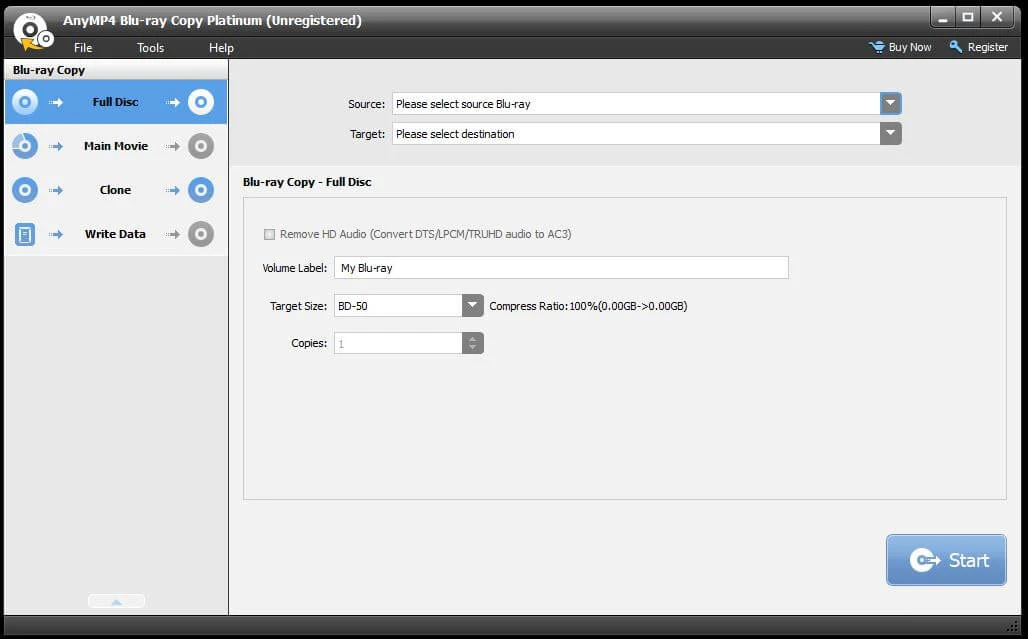
The interface is organized around four copy modes, so the first decision is whether the job is a full backup, main-movie copy, exact clone or data write.
Full Disc and Main Movie
Full Disc is for preserving the entire Blu-ray structure, while Main Movie narrows the job to the principal title and the audio or subtitle tracks you choose.
Clone
Clone is the least configurable mode because its purpose is an exact 1:1 duplicate to a Blu-ray disc or ISO image rather than a customized copy.
Write Data
Write Data handles existing Blu-ray backup data when the destination is compatible Blu-ray media or an ISO target.
Compatibility & Coverage
Blu-ray Copy Platinum is a Windows-only copy utility whose inputs and outputs stay inside Blu-ray disc, folder and ISO structures.
| Area | Current documented coverage | Buyer note |
|---|---|---|
| Windows | Windows 11 / 10 / 8.1 / 8 / 7; Vista and XP SP2+ also listed | The current AnyMP4 reference is Windows-only for this product. |
| Mac | No native Blu-ray Copy Platinum edition listed | AnyMP4's Mac Blu-ray lineup lists Player, Ripper and Toolkit products instead. |
| Input | Homemade Blu-ray disc · Blu-ray folder · Blu-ray ISO image | Physical-disc workflows require Blu-ray hardware capable of reading the source. |
| Output | Blu-ray disc · Blu-ray folder · Blu-ray ISO image | MP4/MKV conversion belongs to the Blu-ray Ripper product class. |
| Disc capacity | BD-25 and BD-50 copying; BD-50 to BD-25 compression documented | Compression to BD-25 is different from an exact 1:1 clone. |
Features & Capabilities
The feature set is intentionally narrow: preserve Blu-ray structure, select how much of the disc to copy and choose whether the destination is disc, folder or ISO.
Full Disc Backup
- Copy the complete Blu-ray structure instead of selecting only the main movie
- Choose a disc, folder or ISO destination according to the workflow
- Select target capacity when the output needs to fit different Blu-ray media
Main Movie Copy
- Copy the main title without carrying every extra item from the original disc
- Select the subtitle and audio tracks required in the copied movie
- Create a Blu-ray folder or ISO image for local backup
1:1 Clone
- Clone the complete Blu-ray to another compatible disc
- Create a Blu-ray ISO image through the clone workflow
- Keep exact cloning separate from capacity-reduction jobs
Write Data & Compression
- Write existing Blu-ray backup data to compatible Blu-ray media
- Create an ISO target in the documented Write Data workflow
- Compress BD-50 content to fit a BD-25 target when needed
Important Conditions & Limitations
Before buying, check the Windows-only platform, Blu-ray hardware, Internet requirement for encrypted discs, trial restrictions and whether your real goal is copying or format conversion.
There Is No Native Mac Edition Listed
The current AnyMP4 product navigation places Blu-ray Copy Platinum under Windows Blu-ray tools and does not list a Mac Blu-ray Copy Platinum counterpart. The supplied checkout data is also Windows-only.
Physical Blu-ray Jobs Need Blu-ray Hardware
Disc-to-disc copying requires a drive that can read the source and compatible writing hardware when the target is another physical Blu-ray.
Encrypted Blu-ray Processing Requires Internet Access
The current user guide states that an Internet connection is required throughout the handling of encrypted Blu-ray files.
BD-50 to BD-25 Is a Compression Job
The product can fit BD-50 content onto BD-25, but that capacity reduction should not be confused with Clone mode's 1:1 purpose.
Copying Is Not the Same as Ripping to MKV or MP4
The technical reference lists Blu-ray disc, folder and ISO as this product's outputs. If you need MKV, MP4 or another ordinary video format, use a Blu-ray ripping workflow instead.
Use Only for Permitted Copying
AnyMP4 specifically warns against using the software to copy rental Blu-rays or create backups for commercial use. Copyright and copy-protection rules vary by jurisdiction, so process only media you are legally allowed to copy.
Free Trial / Free Version
AnyMP4 provides a 15-day free trial for Blu-ray Copy Platinum, but copying and folder or ISO creation are restricted until the software is registered.
| Trial point | Current documented status | Purchase relevance |
|---|---|---|
| Trial duration | 15 days | Enough time to check installation, disc detection and the four copy modes before purchase. |
| Copying limits | The guide says the trial restricts the number of disc-copy operations | The reviewed guide does not publish the exact numeric copy count. |
| Folder / ISO creation | Restricted in the trial | Register the product when unrestricted backup creation is required. |
| Registration | Purchase email and registration code required | Registration removes the trial limits described in the current guide. |
System Requirements
The current AnyMP4 technical reference is Windows-only and recommends 2GB RAM with a 2GHz Intel Core 2 Duo or AMD Athlon-class processor or faster.
| Requirement | Current documented value | Notes |
|---|---|---|
| Operating system | Windows 11 / 10 / 8.1 / 8 / 7; Vista and XP SP2+ also listed | No native Mac Blu-ray Copy Platinum requirement table is published. |
| Processor | Intel Core 2 Duo or AMD Athlon, 2GHz or faster | Current AnyMP4 reference value. |
| RAM | 2GB or more recommended | Current AnyMP4 reference value. |
| Blu-ray hardware | Blu-ray reading/writing hardware as required by the selected physical-disc workflow | A blank compatible Blu-ray is needed when the target is another physical disc. |
| Internet | Required while handling encrypted Blu-ray files | Documented in the current user guide. |
Alternatives & Better-Fit Options
Use these SoftKeyRadar pages when your real task is Blu-ray ripping or playback rather than preserving Blu-ray disc, folder or ISO structure.
AnyMP4 Blu-ray Ripper
Choose the ripper when the goal is to convert Blu-ray content into MP4, MKV or other digital video and audio formats rather than preserve Blu-ray structure.
AnyMP4 Blu-ray Player
Use the player when you only need to watch Blu-ray discs, folders or ISO images and do not need to copy or clone them.
Aiseesoft Blu-ray Player
Compare Aiseesoft Blu-ray Player when playback is the requirement and a second Windows or Mac player option is more useful than a copy utility.
Tipard Blu-ray Player
Use the Tipard page when you want another Blu-ray playback product instead of disc cloning, folder backup or ISO creation.
