
AnyMP4 Blu-ray Ripper converts Blu-ray discs, folders and ISO images into digital video or audio files on Windows and Mac, with lossless profiles and Blu-ray backup options.
Quick Summary
AnyMP4 Blu-ray Ripper is for turning Blu-ray media into files you can store, edit, stream or play without keeping the original disc in the drive. It accepts Blu-ray discs, folders and ISO sources, offers lossless MKV/MP4 routes, supports common video and audio formats, and includes separate Windows and Mac builds.
- Best for
- Blu-ray to MP4/MKV · lossless disc conversion · Blu-ray ISO backup · Plex-ready files · audio extraction
- Platforms
- Windows 11 / 10 / 8.1 / 8 / 7 · macOS 10.12 or later
- License
- 1 Year or Lifetime · Windows and Mac licenses sold separately
- Key limitation
- A real Blu-ray disc needs a Blu-ray drive; a standard DVD drive cannot read Blu-ray media

AnyMP4 Blu-ray Ripper Pricing, Discount Code & License Options
The approved purchase links below carry the supplied 50% discount into checkout. No manual coupon-code entry is required.
Windows and Mac licenses are separate. On each platform, the supplied 1-year price is $28.72 from a regular $57.45, while the lifetime price is $34.97 from a regular $69.95.
Windows Purchase Options

Mac Purchase Options

Can This Software Do What I Need?
The right workflow depends on whether you want a smaller playback file, a lossless container, an ISO archive, a Plex-ready copy or audio extracted from the disc.
I want to convert Blu-ray to MP4, MKV or MOV for normal playback
Disc-to-digital conversion
SupportedLoad the disc, folder or ISO, choose the required video profile and rip the selected titles to a local file.
I want to keep the original audio tracks and subtitles in a lossless file
Lossless MKV/MP4 workflow
SupportedThe current product includes MKV Lossless and MP4 Lossless profiles designed to preserve original streams and parameters instead of re-encoding to a smaller delivery file.
I want an ISO backup instead of an MP4 or MKV
Disc-image archive
SupportedAnyMP4 documents a 1:1 Blu-ray-to-ISO workflow that retains menus, audio tracks, subtitles and other disc parameters.
I want a file for Plex or another media server
Home-media-server playback
SupportedThe software can create Plex-friendly formats such as MP4 or MKV. Choose the container and codec according to the clients that will stream the file.
I only need the soundtrack or a music track from a Blu-ray
Blu-ray audio extraction
SupportedAudio profiles include MP3, FLAC, WAV, AAC, ALAC and other documented formats, so a selected Blu-ray title can be exported as audio rather than video.
I only have a standard DVD drive
Physical Blu-ray source
Not supportedA DVD drive cannot read a Blu-ray disc. Use an internal or external Blu-ray drive when the source is physical Blu-ray media.
I just want to watch a Blu-ray disc without creating a new file
Playback rather than conversion
Better fitA Blu-ray player application is the more direct tool when you do not need to digitize, back up or transcode the disc.
I plan to rip rental discs or distribute commercial copies
Copyright and permitted use
Verify firstAnyMP4 says not to use the product to rip rental Blu-rays or create backups for commercial use. Copyright and copy-protection rules also differ by jurisdiction, so only process media you have the legal right to copy.
How It Works
Load the Blu-ray source, choose the titles and output profile, apply only the edits you need, then write the result to local storage.
Rip Blu-ray to MP4 or MKV
- Insert the disc into a Blu-ray drive and open AnyMP4 Blu-ray Ripper, or load a Blu-ray folder or ISO source.
- Choose the required title list and select a video profile such as MP4, MKV or another supported output.
- Set the destination folder and adjust encoder, resolution, bitrate, subtitles or audio tracks only when the default profile does not match the target.
- Select Rip All to create the digital file.
Create a Lossless MKV or MP4 Copy
- Load the source in AnyMP4 Blu-ray Ripper and select the titles to preserve.
- Choose the documented MKV Lossless or MP4 Lossless profile rather than a normal compressed preset.
- Confirm the selected subtitle and audio streams, choose the destination and start the rip.
Extract Audio from Blu-ray
- Load the disc, folder or ISO in AnyMP4 Blu-ray Ripper.
- Choose the title that contains the required audio.
- Select an audio output such as MP3, FLAC, WAV, AAC or ALAC.
- Set the destination folder and select Rip All.
Prepare a Blu-ray File for Plex
- Load the Blu-ray and select the movie titles in AnyMP4 Blu-ray Ripper.
- Choose an output such as MP4 or MKV that matches your Plex server and playback clients.
- Reduce resolution or bitrate only when file size or network bandwidth makes it necessary.
- Rip the file to the folder that will be added to the Plex library.
Product Interface & Workflow
The interface moves from source loading to title selection, output profile, optional editing and the final Rip All action.
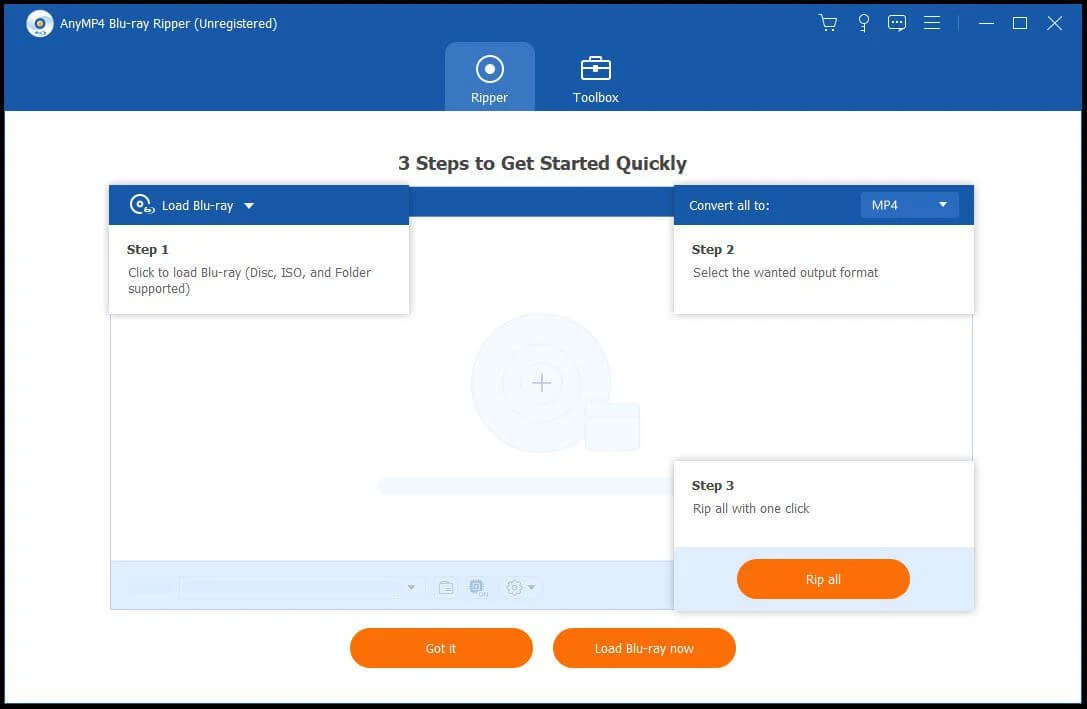
Load Blu-ray and Select Titles
The source stage accepts a physical Blu-ray, a Blu-ray folder or an ISO image. Multi-title discs can be expanded to the full title list when you need more than the main movie.
Output Profiles
Video, audio and device profiles determine whether the result is a common playback file, a lossless container, an audio-only export or a device-oriented encode.
Editing Before Ripping
Cut, crop, rotate, subtitle, audio, effect and enhancement tools are available before export. The current guide notes that some editing functions are unavailable when an MPG Lossless output is selected.
Compatibility & Coverage
The Windows and Mac builds support the same core disc-to-digital job, with platform-specific system requirements and a broad set of video, audio and device outputs.
| Area | Current documented coverage | Buyer note |
|---|---|---|
| Windows | Windows 11 / 10 / 8.1 / 8 / 7, 32-bit and 64-bit | Windows reference requires 1GHz Intel/AMD CPU and 2GB RAM or above. |
| Mac | macOS 10.12 or later; current reference table lists 10.12 through 15 | Mac reference supports 1GHz+ Intel and Apple Silicon processors with 2GB RAM or above. |
| Physical Blu-ray | Internal or external Blu-ray drive | A standard DVD drive does not read Blu-ray discs. |
| Blu-ray sources | Blu-ray disc · Blu-ray folder · Blu-ray ISO image | Mac reference additionally lists AVCHD disc and folder input. |
| Video output | MP4 · MKV · MOV · AVI · WebM · WMV · MPEG and many more | 4K and HD profiles are available for supported codecs and containers. |
| Audio output | MP3 · FLAC · WAV · AAC · ALAC · AC3 · AIFF · WMA and more | Use an audio profile when only the soundtrack or selected audio track is required. |
| Device profiles | iPhone/iPad · Android devices · TVs · Xbox · Chromecast · Roku and more | Profiles simplify codec and resolution choices for common playback targets. |
Features & Capabilities
The useful feature set spans direct disc conversion, lossless archival options, 4K output, audio extraction and pre-rip editing rather than simple one-format transcoding.
Blu-ray to Digital Conversion
- Rip Blu-ray discs, folders and ISO images
- Choose from hundreds of video, audio and device profiles
- Create 4K and 1080p outputs in supported formats
- Convert selected Blu-ray titles instead of processing the entire disc
Lossless & Backup Workflows
- MKV Lossless and MP4 Lossless profiles for original-stream preservation
- 1:1 Blu-ray-to-ISO backup workflow
- Preserve selected audio tracks, subtitles and disc parameters in supported lossless routes
4K, 3D & Device Output
- 4K MP4, MKV, MOV and WebM output profiles
- 3D conversion profiles documented for supported Blu-ray sources
- Device-oriented presets for phones, tablets, TVs, consoles and streaming hardware
Audio Extraction
- Extract soundtrack or selected Blu-ray audio to MP3, FLAC, WAV, AAC, ALAC and more
- Choose audio parameters through the output-profile settings when needed
Editing & Enhancement
- Cut, crop, rotate and merge before ripping
- Add or select subtitles and audio tracks
- Adjust effects and video parameters
- Use the built-in video-enhancement tools for supported workflows
Important Conditions & Limitations
The main buying checks are the optical drive, trial-length limit, Internet requirement for encrypted discs, storage demands and the legal status of the media you intend to process.
A Blu-ray Drive Is Required for Physical Discs
A standard DVD drive cannot read a Blu-ray disc. Folder and ISO sources do not require an optical drive, but physical media needs an internal or external Blu-ray drive.
Encrypted Blu-ray Processing Requires Internet Access
The current AnyMP4 guide states that an Internet connection is required while handling encrypted Blu-ray files. Plan for an online connection even if the final output is stored locally.
Lossless Files Can Be Very Large
Lossless MKV/MP4 and ISO workflows preserve more of the original disc data than compressed MP4 or HEVC profiles, so they require substantially more local storage.
Editing and Lossless Profiles Do Not Always Mix
The current user guide notes that editing is not available with MPG Lossless output. Choose a normal encoded profile when the editing workflow is more important than that lossless route.
Use the Software Only for Lawful Copying
AnyMP4 explicitly says not to rip rental Blu-rays or make commercial-use backups. Copyright and copy-protection rules differ by country, so the software should only be used where you have the legal right to make the intended copy.
Free Trial / Free Version
AnyMP4 provides a free trial for Windows and Mac so you can check disc recognition, title detection and the output workflow before purchasing a full license.
| Trial point | Current documented status | Purchase relevance |
|---|---|---|
| Blu-ray ripping length | 5-minute conversion limit per item in current AnyMP4 guidance | Useful for testing recognition and output quality, but not for a full feature-length movie. |
| Trial registration | Full features require registration with purchase email and registration code | The paid license removes the trial restrictions documented by AnyMP4. |
| Trial platform | Windows and Mac trial downloads are available | Test the same desktop platform you intend to license. |
| Trial purchase protection | 30-day money-back period advertised on the product page | Eligibility remains subject to AnyMP4's current refund conditions. |
System Requirements
The current Windows and Mac reference pages publish separate desktop requirements but both require a real Blu-ray drive for physical discs.
| Requirement | Windows | Mac |
|---|---|---|
| Operating system | Windows 11 / 10 / 8.1 / 8 / 7 | macOS 10.12 or later; current reference table lists through macOS 15 |
| Processor | 1GHz Intel/AMD CPU or above | 1GHz or above Intel or Apple Silicon processor |
| RAM | 2GB or above | 2GB or above |
| Blu-ray drive | Internal or external Blu-ray drive | Internal or external Blu-ray drive |
| Internet | Required for encrypted Blu-ray processing and registration/update services | Required for encrypted Blu-ray processing and registration/update services |
Alternatives & Better-Fit Options
Use these SoftKeyRadar pages when you need direct Blu-ray playback instead of disc conversion, or want to compare another Blu-ray ripping product.
AnyMP4 Blu-ray Player
Choose the player when the goal is direct Blu-ray, DVD or video playback rather than converting discs into new files.
Aiseesoft Blu-ray Player
Use the Aiseesoft player page when you want a different Windows/Mac playback product instead of a ripping workflow.
Tipard Blu-ray Player
Compare Tipard when your requirement is Blu-ray playback and media viewing rather than disc-to-file conversion.
Blu-ray Ripper Software
Browse the Blu-ray Ripper label when you want to compare additional disc-to-digital products before choosing a license.
