
WinX DVD Ripper Platinum is Windows software for ripping DVD discs, folders and ISO images to digital files or backing them up for storage and playback elsewhere.
Quick Summary
WinX DVD Ripper Platinum is built around three jobs: converting DVDs to common digital formats, creating local DVD backups, and preparing disc content for phones, tablets, TVs, media servers and other playback devices. It accepts physical discs, DVD folders and ISO images, includes hardware acceleration, and provides separate profiles for conversion and backup.
- Best for
- DVD digitizing · MP4/HEVC conversion · ISO/folder backup · 99-title and difficult DVD collections
- Platforms
- Windows 11 / 10 / 8.1 / 8 / 7; current technical pages also list older Windows releases
- License
- Lifetime / 1 PC · Lifetime / 2–5 PCs · two separate DVD Copy Pro bundle options
- Key limitation
- The trial converts only the first 5 minutes and disables advanced features

WinX DVD Ripper Platinum Pricing, Discount Code & License Options
The approved checkout links below carry their promotional pricing directly into the order page, so there is no coupon string to copy or enter manually.
The supplied WinX DVD Ripper Platinum lifetime offers are $29.95 for 1 PC with a free gift and $39.95 for 2–5 PCs. Two separate DVD Copy Pro bundles are also provided: $49.95 for the Lifetime + DVD Copy Pro offer and $29.95 for the 1 Year + DVD Copy Pro Lifetime / 1 PC offer.
WinX DVD Ripper Platinum Lifetime Options
Choose the single-PC lifetime offer with the supplied free gift, or the separate lifetime option covering 2–5 Windows PCs. The gift itself is not named in the supplied commercial data, so no gift product is assumed here.

WinX DVD Ripper Platinum Lifetime + DVD Copy Pro
This is the separate $49.95 bundle supplied for buyers who want WinX DVD Ripper Platinum together with WinX DVD Copy Pro rather than the ripper alone.
WinX DVD Ripper Platinum 1 Year + DVD Copy Pro Lifetime
This $29.95 option combines a 1-year WinX DVD Ripper Platinum term with the supplied DVD Copy Pro Lifetime / 1 PC bundle entitlement.
Can This Software Do What I Need?
The right fit depends on whether you want a smaller playback file, a direct DVD backup, a difficult-disc recovery path or the added copying tools in a DVD Copy Pro bundle.
I want to turn DVDs into MP4, HEVC, MOV or another digital format
Everyday DVD digitizing
SupportedLoad the disc, folder or ISO, choose the output profile, then rip to a supported video or audio format for storage or playback on another device.
I want to keep a DVD backup instead of converting it to a smaller file
Archive-oriented workflow
SupportedThe DVD Backup profiles include direct backup routes such as ISO image, DVD folder and MPEG-2 workflows when preserving the disc structure matters more than device-ready compression.
My library includes 99-title, old, scratched or unusual DVDs
Complex disc structures
SupportedWinX documents automatic title detection, 99-title support and disc-file-system controls for problematic sources. Safe Mode is available when a conversion stops or titles are processed in the wrong sequence.
I want to trim scenes, crop the frame or change subtitles before ripping
Output preparation
SupportedThe built-in editor can trim a selected time range, crop the image, merge titles, change subtitle handling and adjust audio volume before the final output is created.
I want DVD-to-DVD copying and more dedicated copy modes
Beyond the ripper's backup profiles
Bundle fitChoose one of the supplied DVD Copy Pro bundles when you also need the separate copier's disc-to-disc, ISO, folder and additional copy modes instead of relying only on WinX DVD Ripper Platinum's backup profiles.
I only need to test whether WinX recognizes my DVD
Pre-purchase compatibility check
Better fitUse the free trial first. It can evaluate the workflow but limits conversion to five minutes and does not unlock the complete paid feature set.
I need the Mac version of this DVD ripper
Different operating system
Different taskThe purchase options on this page are for WinX DVD Ripper Platinum on Windows. Use the MacX DVD Ripper product family for macOS rather than buying a Windows license.
I need to copy protected commercial DVDs where I live
Copyright and circumvention rules
Verify firstThe vendor documents support for protected and region-coded DVD structures. Whether you may bypass protection or make a copy depends on the law and rights that apply to the disc in your country.
How It Works
The core workflow is short: load the source, choose a conversion or backup profile, review optional settings and run the job.
Rip a DVD to MP4, HEVC or Another Video Format
- Open WinX DVD Ripper Platinum and load a DVD Disc, ISO Image or DVD Folder.
- Choose the output profile that matches the target format or playback device.
- Set the destination folder and adjust codec, bitrate, frame rate, resolution or audio settings only when the default profile is not enough.
- Select RUN to begin ripping the selected title.
Create a DVD Backup
- Load the DVD source in WinX DVD Ripper Platinum.
- Open the DVD Backup Profile category rather than choosing a compressed device profile.
- Choose the appropriate ISO, DVD folder, MPEG-2 or title-based backup route for the archive you want to keep.
- Select the destination storage location and start the backup.
Trim, Crop or Add an External Subtitle
- Load the DVD and select the output profile first.
- Open the editing controls to trim the required time range or crop the visible frame.
- Choose an existing subtitle, add an external SRT subtitle or adjust subtitle placement when needed.
- Confirm the settings and start the rip.
Product Interface & Workflow
The interface follows the same order as the job itself: load the DVD source, pick the output profile, make any optional edits and start the rip.
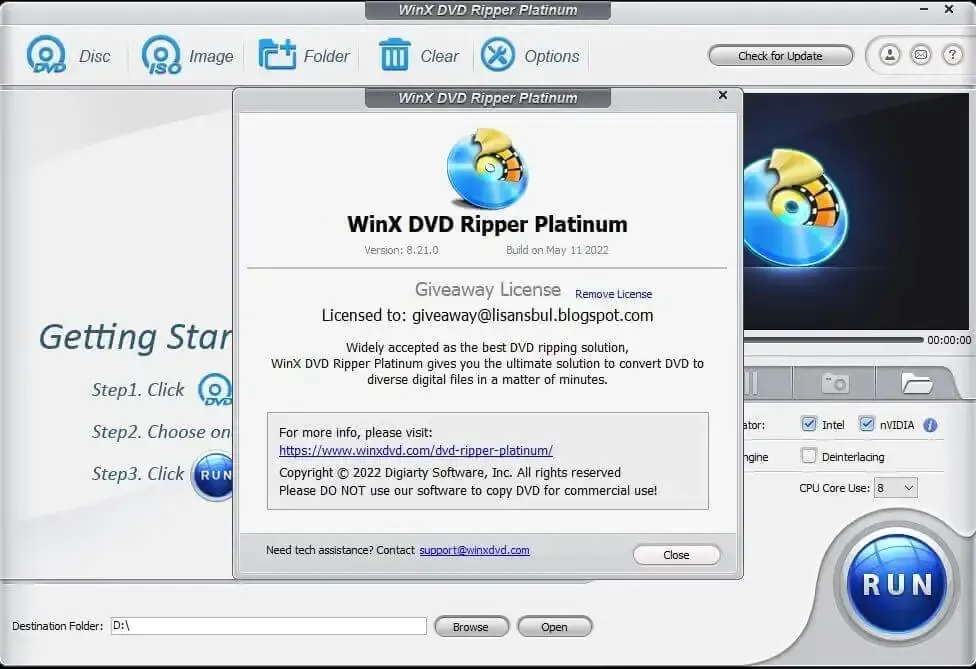
Source Loading and Automatic Title Detection
DVD Disc, ISO Image and Folder controls determine the source. After import, WinX analyzes the DVD and selects the likely main title automatically, which is especially useful on multi-title and 99-title discs.
Output Profiles and Advanced Settings
The Output Profile window separates general formats, DVD backup modes, device presets, web video and common video/music outputs. A settings control exposes codec, bitrate, frame rate, aspect ratio, resolution and audio parameters when a preset needs adjustment.
Preview, Editing and Final Run
The preview area is used to inspect the selected title and take snapshots. Crop, trim, subtitle and volume controls sit before the final RUN action so the output can be prepared without switching to another editor.
Compatibility & Coverage
WinX DVD Ripper Platinum covers standard disc sources, protected DVD structures and a wide range of digital outputs on Windows.
| Area | Current documented coverage | Buyer note |
|---|---|---|
| Windows | Windows 11 / 10 / 8.1 / 8 / 7; technical page also lists Vista, XP, 2003 and 2000 | The commercial offers on this page are Windows purchases. |
| DVD input | DVD disc · DVD folder · ISO image | A physical DVD requires a working optical drive. |
| Disc structures | Commercial · homemade · RCE · UOP · Sony ARccOS · Disney X-project DRM · APS | The vendor documents these structures as compatible; lawful use still depends on local rules. |
| Common digital output | MP4/H.264 · HEVC/H.265 · MOV · AVI · MPEG · WMV · MTS · M2TS · TS · M4V and more | Choose by target device, storage need and compatibility. |
| Backup output | ISO image · DVD folder · MPEG-2 · title-based backup modes | Use backup profiles instead of re-encoding when the archive structure matters more than compression. |
| Device profiles | iPhone/iPad · Android · Apple TV · Xbox · PlayStation · smart TV · Chromecast and more | Device profiles simplify output settings for common playback targets. |
Features & Capabilities
The feature set is strongest when a DVD needs to become a smaller digital file, a direct backup or a device-ready copy without building the output settings from scratch.
DVD Loading & Disc Analysis
- Loads DVD discs, folders and ISO image files
- Automatically detects the likely correct title
- Supports multi-title and 99-title disc structures documented by WinX
- Provides Auto Detect, Force UDF and Force ISO file-system handling options
- Safe Mode is available for conversion-order or unexpected-stop problems
Video, Audio & Device Output
- Outputs MP4/H.264, HEVC/H.265, MOV, AVI, MPEG, M4V and other common video formats
- Extracts audio to formats such as MP3 and AAC
- Includes ready-made profiles for phones, tablets, TVs, game consoles and other devices
- Lets advanced users change codec, bitrate, frame rate, resolution, aspect ratio and audio parameters
DVD Backup Modes
- Separate DVD Backup Profile category
- ISO image, DVD folder and MPEG-2 backup workflows
- Full-title and main-title choices for different archive needs
- Direct backup routes avoid unnecessary re-encoding when the source structure should be retained
Editing Before Export
- Trim a selected section instead of ripping the full title
- Crop the picture or expand it to the target profile resolution
- Select built-in subtitles or add an external SRT subtitle
- Adjust subtitle placement and audio volume
- Merge selected titles into one output file
Hardware Acceleration
WinX advertises GPU-assisted decoding, processing and encoding and promotes very short full-DVD conversion times on supported hardware. Those speed figures are vendor claims; real processing time depends on the CPU/GPU, optical drive, disc condition, output codec and whether the job is direct backup or re-encoding.
Important Conditions & Limitations
Before buying, check the operating system, the trial restriction, whether you need DVD Copy Pro, and whether your intended use of protected media is lawful where you live.
The Supplied Purchase Options Are for Windows
WinX DVD Ripper Platinum on this page is the Windows product. The related Mac product is MacX DVD Ripper Pro, so do not buy one of these checkout links for a Mac installation.
The Free Gift in the $29.95 Lifetime Offer Is Not Identified in the Supplied Data
The approved commercial line states “Lifetime / 1 PC + Free Gift” but does not name the gift. The purchase box therefore keeps the gift wording without inventing another product or licence term.
The Two DVD Copy Pro Bundles Have Different Licence Structures
One supplied offer is labeled “Lifetime + DVD Copy Pro” at $49.95. The other is explicitly “1 Year + DVD Copy Pro Lifetime / 1 PC” at $29.95. They are shown separately so their terms are not collapsed into one generic bundle.
DVD Copy Pro Is a Separate Product
The bundle adds WinX DVD Copy Pro for dedicated disc copying, ISO/folder backup and related copy modes. Those functions should not be mistaken for extra modes built directly into the WinX DVD Ripper Platinum interface.
Protected-DVD Use Depends on Applicable Law
The vendor documents support for region-coded and protected DVD structures, but technical capability does not determine legal permission. Use the software only where you have the right to make the intended copy.
Free Trial / Free Version
WinX DVD Ripper Platinum has a downloadable trial for testing source recognition and the ripping workflow before purchasing a full licence.
| Trial point | Current documented status | Purchase relevance |
|---|---|---|
| Conversion limit | First 5 minutes only | Enough to test a source and profile, but not to convert a full feature-length DVD. |
| Advanced features | Not available in the trial | The trial does not represent every function unlocked by a full licence. |
| Full-version updates | Trial does not include free updates to the latest full version | The paid licence is the route to the full product and its applicable update entitlement. |
| Registration | Licensed email + licence code | The full-version registration information is delivered by email after purchase. |
System Requirements
The current technical page clearly lists the Windows families and supported source types, while no matching current CPU/RAM minimum table is published on the reference page reviewed.
| Requirement | Current documented value | Notes |
|---|---|---|
| Windows | Windows 11 / 10 / 8.1 / 8 / 7; legacy support also listed for Vista, XP, 2003 and 2000 | Use a current Windows release for an actively maintained PC where possible. |
| DVD source | DVD disc · DVD folder · ISO image | A physical disc requires a working internal or external DVD drive. |
| Hardware acceleration | Available on supported GPU hardware | Acceleration depends on compatible decoding/encoding hardware and the selected output workflow. |
| CPU / RAM / free space | No current minimum table identified on the official technical page reviewed | No unsupported minimum values are added here. |
| macOS | Not the product sold through these purchase links | Use MacX DVD Ripper Pro for the Mac product line. |
Alternatives & Better-Fit Options
Use these SoftKeyRadar pages when you want more WinX purchase choices, need the Mac version or want to compare another multimedia software family.
WinX DVD Software Deals
Use the WinX DVD store page when you want to compare more WinX purchase options instead of limiting the decision to this single ripper page.
MacX DVD Software Deals
Use the MacX DVD store page when the same DVD digitizing job needs to be done on macOS rather than Windows.
WonderFox Software Deals
Use the WonderFox store page when you want to compare another Windows multimedia software family before buying.
MacX DVD Ripper Pro
Choose the MacX DVD Ripper Pro page when you need the Mac counterpart for DVD ripping, backup and conversion.
